Oracle Database startup and shutdown modes
(Somewhat outdated material. Relevant primarily for version 9, needs revision)
Starting Oracle Database
STARTUP [FORCE][restrict] [MOUNT | OPEN | NOMOUNT]
STARTUP NOMOUNT
Starting the database instance: NOMOUNT state
During database instance startup, it is necessary to select the state that the instance will enter as a result.
Usually the instance is started in NOMOUNT mode only during database creation or to recreate control files, as well as when performing certain backup and recovery scenarios.
Starting the instance involves performing the following tasks:
1) Searching the $ORACLE_HOME/dbs directory for the parameter file, carried out in the following order.
• It searches for the spfileSID.ora file
• If not found, then it searches for the spfile.ora file;
• If not found, then it searches for the SID.ora file.
The searched file contains the database instance parameters;
- Setting the PFILE parameter in the STARTUP command overrides the default order for selecting the parameter file.
- Allocating SGA;
- Starting background processes.
- Opening the alertSID.log file and trace files.
STARTUP MOUNT
Mounting the database includes the following tasks:
Associating the database with a previously started instance:
Determining the location of control files specified in the parameter file:
Reading control files to obtain the names and status of data files and log files. However, at this point the actual existence of data files and log files is not verified.
STARTUP OPEN
Opening the database involves performing the following tasks:
• Opening online data files;
• Opening online redo log files.
If any of the data files or redo log files are unavailable at the time of database opening, the Oracle server returns an error.
When performing the final stage of database opening, Oracle checks the availability of all data files and redo log files, and also checks the integrity of the database. If necessary, the background process System Monitor (SMON) initiates instance recovery.
Stopping Oracle Database
SHUTDOWN [NORMAL | TRANSACTIONAL | IMMEDIATE | ABORT]
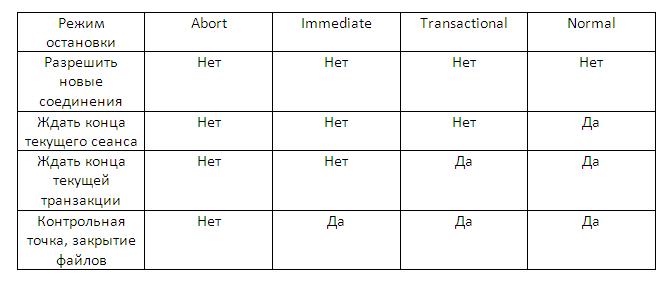
ABORT – Performs the least number of actions before stopping. After this, upon startup, the system must perform recovery. Therefore, use this mode only when necessary. It is usually used when other shutdown options don’t work, when it is caused by problems arising during startup, or when you need to immediately stop the instance before a problematic situation, for example, when receiving a message that the power will be turned off in a few seconds.
IMMEDIATE – commonly used option. Uncommitted transactions are rolled back.
TRANSACTIONAL – Allows transactions to complete.
NORMAL – The instance does not stop until sessions disconnect.
SHUTDOWN NORMAL
Normal database shutdown mode, used by default.
• New connections are not allowed.
• The Oracle server waits for all users to disconnect and only then proceeds with the database shutdown.
• Buffers from the database and redo log cache are written to disk.
• Background processes terminate and SGA is removed from memory.
• Before stopping the instance, Oracle closes and dismounts the database.
• The next startup will not require instance recovery.
SHUTDOWN TRANSACTIONAL
Transactional shutdown ensures the preservation of client data, including the results of current actions. Database shutdown in transactional mode occurs as follows:
• No client can start a new transaction in this instance.
• The client is forcibly disconnected as soon as the current transaction completes.
• Once all transactions are complete, shutdown is performed immediately.
• The next startup will not require instance recovery.
SHUTDOWN IMMEDIATE
Immediate database shutdown is performed as follows:
• Processing of SQL commands currently being executed by Oracle is not completed.
• The Oracle server does not wait for currently connected users to disconnect.
• Oracle rolls back all active transactions and forcibly disconnects all users.
• Oracle closes and dismounts the database before stopping the instance.
• The next startup will not require instance recovery.
SHUTDOWN ABORT
If normal and immediate shutdown modes don’t work, an emergency database shutdown can be performed. Emergency instance shutdown is performed as follows:
All SQL commands being processed by the Oracle server are immediately cancelled.
The Oracle server does not wait for currently connected users to disconnect.
Buffers from the database and redo log cache are not written to disk.
Uncommitted transactions are not rolled back.
The database is not closed or dismounted.
The instance is removed without closing files.
The next startup will require instance recovery, which will occur automatically.