Segments > Extents > Blocks
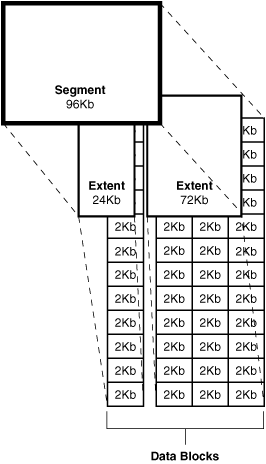
Data Block
A data block is the smallest building block of an Oracle database, consisting of a certain number of bytes on disk. An Oracle data block is a logical component of the database. The disks on which Oracle blocks reside are themselves divided into data blocks. Usually, disk data blocks correspond to Oracle data blocks. The Oracle database block size is set by the DB_BLOCK_SIZE parameter in the init.ora file. The block size should be understood as the minimum unit of update, selection, or insertion of data. The commonly accepted block size is 8 KB. If you choose a block size of 64 KB, even when retrieving a name with a length of four characters, you’ll have to read the entire block of 64 KB containing the four characters of interest.
All data blocks can be divided into two main parts: the data row part and the free space part.
Extent
An extent is two or more consecutive Oracle data blocks that represent a unit of disk space allocation. When several contiguous data blocks are combined, they are called an extent. When you create a database object like a table or index, you allocate them some initial amount of space, called the initial extent, and additionally specify the size of the next extent. Once allocated to a table or index, extents remain allocated to that specific object until you delete that object from the database - then the space occupied by it returns to the database free space pool.
Segment
A segment is a set of extents that you allocate to a logical structure such as a table or index (or some other object). The set of extents forms the next larger storage unit, called a segment. Oracle refers to all space allocated to any particular database object as a segment. So if you have a table named Customer, you simply refer to the space allocated for it as “the Customer segment”. When you create an index, it gets its own segment named after it. Data and index segments are the most common type of Oracle segments. There are also temporary segments that the database uses in transactions involving sorting, as well as rollback segments that the database uses to store rollback information. When all extents of a segment are full, Oracle automatically allocates additional extents as needed, and these segments may be non-contiguous.
 SQL> desc DBA_SEGMENTS
 Name                                      Null?    Type
 ----------------------------------------- -------- ----------------------------
 OWNER                                              VARCHAR2(30)
 SEGMENT_NAME                                       VARCHAR2(81)
 PARTITION_NAME                                     VARCHAR2(30)
 SEGMENT_TYPE                                       VARCHAR2(18)
 SEGMENT_SUBTYPE                                    VARCHAR2(10)
 TABLESPACE_NAME                                    VARCHAR2(30)
 HEADER_FILE                                        NUMBER
 HEADER_BLOCK                                       NUMBER
 BYTES                                              NUMBER
 BLOCKS                                             NUMBER
 EXTENTS                                            NUMBER
 INITIAL_EXTENT                                     NUMBER
 NEXT_EXTENT                                        NUMBER
 MIN_EXTENTS                                        NUMBER
 MAX_EXTENTS                                        NUMBER
 MAX_SIZE                                           NUMBER
 RETENTION                                          VARCHAR2(7)
 MINRETENTION                                       NUMBER
 PCT_INCREASE                                       NUMBER
 FREELISTS                                          NUMBER
 FREELIST_GROUPS                                    NUMBER
 RELATIVE_FNO                                       NUMBER
 BUFFER_POOL                                        VARCHAR2(7)
 FLASH_CACHE                                        VARCHAR2(7)
 CELL_FLASH_CACHE                                   VARCHAR2(7)
SQL> desc DBA_EXTENTS
 Name                                      Null?    Type
 ----------------------------------------- -------- ----------------------------
 OWNER                                              VARCHAR2(30)
 SEGMENT_NAME                                       VARCHAR2(81)
 PARTITION_NAME                                     VARCHAR2(30)
 SEGMENT_TYPE                                       VARCHAR2(18)
 TABLESPACE_NAME                                    VARCHAR2(30)
 EXTENT_ID                                          NUMBER
 FILE_ID                                            NUMBER
 BLOCK_ID                                           NUMBER
 BYTES                                              NUMBER
 BLOCKS                                             NUMBER
 RELATIVE_FNO                                       NUMBER
 SQL> desc DBA_FREE_SPACE
 Name                                      Null?    Type
 ----------------------------------------- -------- ----------------------------
 TABLESPACE_NAME                                    VARCHAR2(30)
 FILE_ID                                            NUMBER
 BLOCK_ID                                           NUMBER
 BYTES                                              NUMBER
 BLOCKS                                             NUMBER
 RELATIVE_FNO                                       NUMBER
Displaying Segment Information
SQL> SELECT SEGMENT_NAME, TABLESPACE_NAME, BYTES, BLOCKS, EXTENTS
    FROM DBA_SEGMENTS
    WHERE SEGMENT_TYPE = 'INDEX'
    AND OWNER='HR'
    ORDER BY SEGMENT_NAME;
Displaying Extent Information
SQL> SELECT SEGMENT_NAME, SEGMENT_TYPE, TABLESPACE_NAME, EXTENT_ID, BYTES, BLOCKS
    FROM DBA_EXTENTS
    WHERE SEGMENT_TYPE = 'INDEX'
    AND OWNER='HR'
    ORDER BY SEGMENT_NAME;
Displaying the Free Space (Extents) in a Tablespace
SQL> SELECT TABLESPACE_NAME, FILE_ID, BYTES, BLOCKS
    FROM DBA_FREE_SPACE
    WHERE TABLESPACE_NAME='SMUNDO';
SQL>  SELECT segment_name, file_id, block_id
FROM dba_extents
WHERE owner = 'SCOTT'
AND segment_name LIKE 'DEPT%';
SQL> select distinct bytes/blocks from user_segments;
BYTES/BLOCKS
------------
        8192
SQL> create tablespace myts1 datafile '/u02/oradata/ora112/myts1_1.dbf' size 512k extent management local;
SQL> create table myt1 (x int) storage(initial 256k next 256k) tablespace myts1;
SQL> select extent_id, bytes, blocks from dba_extents where segment_name = 'MYT1';
 EXTENT_ID      BYTES     BLOCKS
---------- ---------- ----------
         0      65536          8
         1      65536          8
         2      65536          8
         3      65536          8
allocate extent
SQL> alter table myt1 allocate extent;

Table altered.
SQL> alter table myt1 allocate extent;

Table altered.
SQL> alter table myt1 allocate extent;

Table altered.
SQL> alter table myt1 allocate extent;
alter table myt1 allocate extent
*
ERROR at line 1:
ORA-01653: unable to extend table SYSTEM.MYT1 by 8 in tablespace MYTS1
SQL>

 EXTENT_ID      BYTES     BLOCKS
---------- ---------- ----------
         0      65536          8
         1      65536          8
         2      65536          8
         3      65536          8
         4      65536          8
         5      65536          8
         6      65536          8

7 rows selected.
7 extents _ 8 blocks _ block_size (8K) = 448 K And datafile is 512k Logically there should be 512k - 448k = 64K free space
SQL> select extents from dba_segments where segment_name = 'MYT1';
   EXTENTS
----------
         7
SQL> select blocks from dba_extents where segment_name = 'MYT1';
    BLOCKS
----------
         8
         8
         8
         8
         8
         8
         8

7 rows selected.