Oracle Database Files
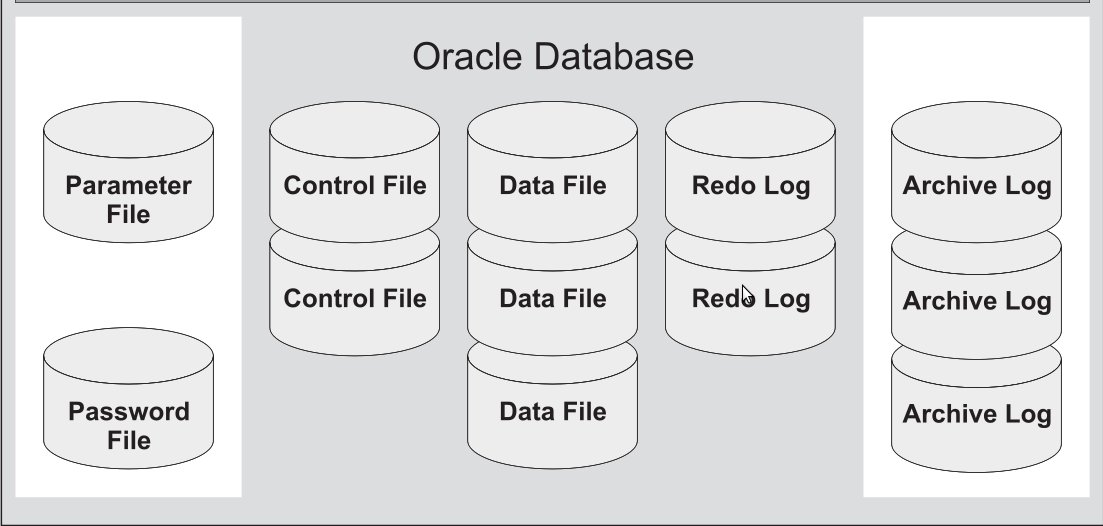
It is assumed that you have installed the database according to the documentation.
Mandatory files:
Optional files:
- Archive Log Files (optional in the sense that the database can be configured to work without these files)
- Alert log and trace files (Alertlog - if there is no need to study error data, it can be deleted. Trace files are not created by default. To create them, you need to enable tracing and then remember to disable it)
- Password File(Not used by default. Must be specifically created with special commands.)
Data Files
All data in the Oracle database is stored in data files. All tables, indexes, triggers, sequences, PL/SQL programs, views - all of this is in data files. And although these and other database objects are logically contained in tablespaces, they are actually stored in files on the computer’s hard drive.
Each Oracle database has at least one data file (but usually there are more). If you create a table in Oracle and fill it with rows, Oracle places that table and rows into a data file. Each data file can be associated with only one database.
Each data file has a special format, internal to Oracle software. It is important to understand that a data file consists of a header and a set of blocks. The Oracle data file header contains several structures, including the database identifier, file number and name, file type, creation SCN, and file status.
Data is written to files exclusively by Oracle.
The following query will show where the data files are located.
SQL> set linesize 200;
SQL> set pagesize 0;
SQL> col  name format a40;
SQL> select file#, name, status from v$datafile;
1 /u02/oradata/ora112/system01.dbf         SYSTEM
2 /u02/oradata/ora112/sysaux01.dbf         ONLINE
3 /u02/oradata/ora112/undotbs01.dbf        ONLINE
4 /u02/oradata/ora112/users01.dbf          ONLINE
5 /u02/oradata/ora112/my_indexes01.dbf     ONLINE
6 /u02/oradata/ora112/my_data01.dbf        ONLINE
Online Redo Log Files
Online redo log files are designed to record all changes made to Oracle database data. They are used to store on disk the information for re-execution of operations.
For a computer to re-execute tasks means to execute it exactly as it was executed the previous time. Therefore, the purpose of the online redo log file is to save information about changes in the database in such a way that they can later be repeated.
Each database must have at least two online redo log files. The current file gradually fills up, after it is filled (or switched by some commands), the database proceeds to write to the next file. This operation is called a log switch.
Since redo files are necessary for database recovery and are critical, they are combined into groups. Writing occurs simultaneously to files in the same group.
SQL> set linesize 200;
SQL> set pagesize 0;
SQL> col  member format a50;
SQL> select group#, member from v$logfile order by group#;
1 /u02/oradata/ora112/redo01.log
1 /u01/app/oracle/fast_recovery_area/redo01.log
2 /u01/app/oracle/fast_recovery_area/redo02.log
2 /u02/oradata/ora112/redo02.log
3 /u01/app/oracle/fast_recovery_area/redo03.log
3 /u02/oradata/ora112/redo03.log
Control Files
Since the Oracle database is a physical set of related data files, special methods are required for their synchronization and control. Control files are used for these purposes.
An Oracle database can have one or more control files. If there are multiple control files, they must all be absolutely identical. Each time the database is started, Oracle reads the information from the control file, and each time the location changes or new data files and database logs are added, the control file is updated.
SQL> set linesize 200;
SQL> set pagesize 0;
SQL> col  name format a100;
SQL> select name from v$controlfile;
/u02/oradata/ora112/control01.ctl
/u02/oradata/ora112/control03.ctl
/u01/app/oracle/fast_recovery_area/ora112/control02.ctl
Parameter Files pfile, spfile
Parameter files are used to configure Oracle actions primarily at startup. To start the database instance, Oracle must read the parameter file and determine which initialization parameters are set for this instance. The parameter file contains numerous parameters and their set values. Oracle reads the parameter file when starting the database. You can create multiple parameter files, each corresponding to different instance configurations.
- spfile - binary file used by Oracle server at startup.
- pfile - text file with parameters, will be used at startup if no spfile is found.
$ ls /u01/app/oracle/product/11.2/dbs/*.ora
/u01/app/oracle/product/11.2/dbs/init.ora
/u01/app/oracle/product/11.2/dbs/spfileora112.ora
At startup, Oracle reads the spfileora112.ora file (server parameter file). The advantage of spfile is that when working with the database, any changes to the database regarding parameter changes are automatically written to this file.
If pfile is used, to save changes, you must either “manually make these changes” in the text file, or execute commands in the console for Oracle to create these files.
// creating pfile from memory (in Oracle 11)
SQL> create pfile from memory;
// create pfile from spfile
SQL> Create pfile from spfile;
How can I tell if my database is using PFILE or SPFILE?
Run the following query to see which parameter file was used:
SELECT DECODE(value, NULL, 'PFILE', 'SPFILE') "Init File Type"
FROM sys.v_$parameter WHERE name = 'spfile';
Init F
------
SPFILE
SQL> show parameter spfile;
NAME                                 TYPE        VALUE
------------------------------------ ----------- ------------------------------
spfile                               string      /u01/app/oracle/product/11.2/d
                                                     bs/spfileora112.ora
Archive Log Files
As soon as the online redo log file (Redolog) is filled, the Oracle server software starts writing to the next file. This operation is repeated, as a result, the information in the online redo log files (Redolog) is repeatedly overwritten.
If you need to preserve the history of changes, you need to have their copy saved after log switches. To do this, simply switch the database to ARCHIVELOG mode.
Archive redo log files are vital for recovery. If part of the database is lost or damaged, several archive logs or a whole bunch of them are usually required to repair the damage. Redo log files must be applied to the database sequentially. If one of the archive redo log files is missing, the remaining archive redo log files cannot be used. Keep all your archive redo log files from the time of the last backup. Log files gradually accumulate and grow. Sometimes they need to be deleted. All operations with these files for applying them to the database are performed exclusively by the database. But you can copy and move them as you wish. Mindlessly deleting them manually is not recommended.
SQL> set linesize 200;
SQL> set pagesize 0;
SQL> col  name format a100;
SQL> select name from v$archived_log;
...
/u01/app/oracle/fast_recovery_area/ORA112/archivelog/2011_11_22/o1_mf_1_11_7dq050f1_.arc
/u01/app/oracle/fast_recovery_area/ORA112/archivelog/2011_11_23/o1_mf_1_12_7dsykrjd_.arc
/u01/app/oracle/fast_recovery_area/ORA112/archivelog/2011_11_24/o1_mf_1_13_7dw3fy96_.arc
/u01/app/oracle/fast_recovery_area/ORA112/archivelog/2011_11_24/o1_mf_1_14_7dw3ys4f_.arc
/u01/app/oracle/fast_recovery_area/ORA112/archivelog/2011_11_26/o1_mf_1_15_7f04bqyq_.arc
...
Alert log and trace files
During database operation, events and errors are logged in text files on the database server. The alert log is needed by the database administrator to track critical database actions - such as opening and closing the database, setting database load parameters, and switching online redo logs. Many database errors are also recorded in these files for subsequent investigation of their causes. Any structural changes to the database are also recorded in the alert log file.
// in Oracle 11 by default:
$ ls /u01/app/oracle/diag/rdbms/rdb115/RDB115/trace
alert_${SID_NAME}.log
// in Oracle 11 an XML version appeared. By default:
$ ls /u01/app/oracle/diag/rdbms/ora112/ora112/alertlog.xml
When a database error occurs, a trace file may be generated. It contains detailed information about the error occurrence.
// in Oracle 11 by default trace files are stored in
/u01/app/oracle/diag/rdbms/ora112/ora112/trace
// The following command will display information about the trace file location
SQL> show parameter dump_dest
Password File
An optional file, used to protect connection information of privileged users. If absent, you can only administer your database locally. In addition, it controls the number of privileged connections for management at the same time.
$ ls /u01/app/oracle/product/11.2/dbs/orapw*
/u01/app/oracle/product/11.2/dbs/orapwora112