Network setup (Configuring the Listener process)
2 configuration files handle Oracle connection.
One is mandatory (listener.ora) and one is more for convenience, but for some programs it may also be mandatory
(tnsnames.ora).
By default, files are stored:
/u01/app/oracle/product/11.2/network/admin
listener.ora
LISTENER =
  (DESCRIPTION_LIST =
    (DESCRIPTION =
      (ADDRESS_LIST =
        (ADDRESS = (PROTOCOL = TCP)(HOST = hostname.domain.com)(PORT = "port_number"))
      )
    )
  )

SID_LIST_LISTENER =
  (SID_LIST =
  (SID_DESC =
      (GLOBAL_DBNAME = SID1)
      (ORACLE_HOME = /u01/app/oracle/product/11.2)
      (SID_NAME = SID1)
    )
  (SID_DESC =
      (GLOBAL_DBNAME = SID2)
      (ORACLE_HOME = /u01/app/oracle/product/11.2)
      (SID_NAME = SID2)
    )

  )
tnsnames.ora
This file describes the details of connecting to the database. This makes it possible not to explicitly specify some parameters (e.g., host, port, etc.). And immediately connect by name.
SID1 =
  (DESCRIPTION =
    (ADDRESS_LIST =
      (ADDRESS = (PROTOCOL = TCP)(HOST = hostname.domain.com)(PORT = "port_number"))
    )
    (CONNECT_DATA =
      (SERVER = DEDICATED)
      (SERVICE_NAME = SID1)
    )
  )

SID2 =
  (DESCRIPTION =
    (ADDRESS_LIST =
      (ADDRESS = (PROTOCOL = TCP)(HOST = hostname.domain.com)(PORT = "port_number"))
    )
    (CONNECT_DATA =
      (SERVER = DEDICATED)
      (SERVICE_NAME = SID2)
    )
  )
// Should work (But not sure)
$ tnsping SID2
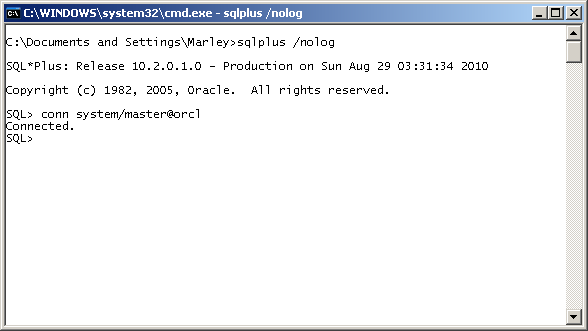
In the following example, a connection to the database is made using the record named orcl in the tnsnames.ora file.
That is, to connect to the database, you don’t need to additionally enter host, port, sid
Basic Listener service commands:
$ lsnrctl status
$ lsnrctl stop
$ lsnrctl start
$ lsnrctl restart
Listener information from the command line:
$ ps -edf | grep tns
root        13     2  0 Aug09 ?        00:00:00 [netns]
oracle12  6604     1  0 Aug09 ?        00:00:02 /u01/oracle/grid/12.1/bin/tnslsnr LISTENER -no_crs_notify -inherit
oracle12 16991 14456  0 09:26 pts/1    00:00:00 grep tns
$ lsnrctl services

LSNRCTL for Linux: Version 12.1.0.2.0 - Production on 15-AUG-2015 15:09:04

Copyright (c) 1991, 2014, Oracle.  All rights reserved.

Connecting to (ADDRESS=(PROTOCOL=tcp)(HOST=)(PORT=1521))
Services Summary...
Service "+ASM" has 1 instance(s).
  Instance "+ASM", status READY, has 1 handler(s) for this service...
    Handler(s):
      "DEDICATED" established:0 refused:0 state:ready
          LOCAL SERVER
Service "orcl12XDB" has 1 instance(s).
  Instance "orcl12", status READY, has 1 handler(s) for this service...
    Handler(s):
      "D000" established:0 refused:0 current:0 max:1022 state:ready
          DISPATCHER <machine: piter.localdomain, pid: 8805>
          (ADDRESS=(PROTOCOL=tcp)(HOST=piter.localdomain)(PORT=60254))
Service "slave" has 1 instance(s).
  Instance "orcl12", status READY, has 1 handler(s) for this service...
    Handler(s):
      "DEDICATED" established:0 refused:0 state:ready
          LOCAL SERVER
Service "slave_DGB" has 1 instance(s).
  Instance "orcl12", status READY, has 1 handler(s) for this service...
    Handler(s):
      "DEDICATED" established:0 refused:0 state:ready
          LOCAL SERVER
The command completed successfully
Listener information from sqlplus console:
SQL> show parameter local_listener;

NAME				     TYPE	 VALUE
----------------------------------- ----------- ------------------------------
local_listener			     string	 LISTENER_ORCL12
SQL> show parameter listener

NAME				     TYPE
----------------------------------- ---------------------------------
VALUE
------------------------------
listener_networks		     string

local_listener			     string

remote_listener 		     string
SQL> alter system set local_listener='(DESCRIPTION =(ADDRESS = (PROTOCOL = TCP)(HOST = moscow.localdomain)(PORT = 1521)))' scope=both;
OFFTOPIC Listener for grid
$ srvctl status listener
Listener LISTENER is enabled
Listener LISTENER is running on node(s): piter
$ srvctl config listener
Name: LISTENER
Type: Database Listener
Home: /u01/oracle/grid/12.1
End points: TCP:1521
Listener is enabled.
Method to configure tnsnames suggested in the chat:
connect / as sysdba
alter session set container=pdb_a;
alter system register;
After this, it will register in the listener if it wasn’t there before.
In tnsnames.ora (just fix the ip address)
pdb_a =
(DESCRIPTION=(ADDRESS_LIST=(ADDRESS=(PROTOCOL=TCP) (HOST=10.1.1.14) (PORT=1521))) (CONNECT_DATA=(SERVICE_NAME=pdb_a)))
https://t.me/oracledba_net/7971