[Oracle DataBase Server 12.2 Installation on Oracle Linux 7.4]: Distributions and Additional Software
The latest versions of Oracle DB and critical patch updates are available to commercial subscribers with an active technical support contract. If you have a support contract, you can download database distributions directly from support.oracle.com.
If you don’t have a contract, simply registering on the Oracle website will not be enough to download the latest versions, even for study purposes.
There are no activation keys required. For development, distributions can be used for free, but for their intended use (production), a license must be purchased.
Software:
VirtualBox:
http://www.virtualbox.org/wiki/Downloads
Oracle Linux Server 7 Update 4 (x86_x64) distributions:
http://linux.oracle.com
Backup download sources:
hxxp://rutracker.org/forum/viewtopic.php?t=4603407
Oracle Database (12.1) Linux x64 distributions:
http://www.oracle.com/technetwork/database/enterprise-edition/downloads/index.html
Backup download sources:
hxxp://rutracker.org/forum/viewtopic.php?p=65149195#65149195
For installation, the following are sufficient:
linuxamd64_12c_database_1of2.zip
linuxamd64_12c_database_2of2.zip
If the computer from which the installation is managed runs Windows:
Putty (SSH Client):
http://www.putty.org/
XMing (For displaying graphical windows during installation) (need to install XMing, additional fonts, and restart the computer):
http://sourceforge.net/projects/xming/
http://sourceforge.net/projects/xming/files/Xming-fonts/
Next, configure access rules.
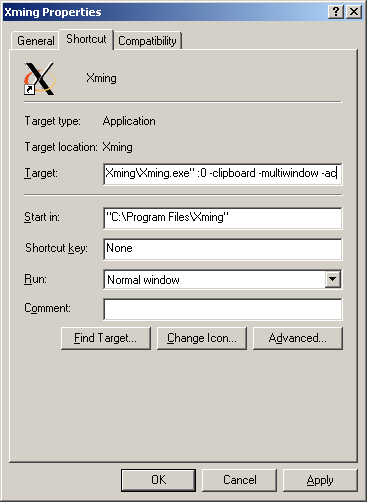
In the simplest case, right-click on the xming shortcut. Go to properties and add -ac to the target (i.e., no access control)
winscp (For copying files to the server):
http://winscp.net/eng/download.php
If the computer from which the installation is managed runs Linux:
Everything is already there