Installation of Oracle Instant Client 11.2 on Oracle Linux
Distrib:
http://www.oracle.com/technetwork/topics/linuxx86-64soft-092277.html
Info:
http://docs.oracle.com/cd/E11882_01/server.112/e16604/apd.htm
Required:
- instantclient-basic-linux.x64-11.2.0.3.0.zip
- instantclient-sqlplus-linux.x64-11.2.0.3.0.zip
Archives should be extracted into 1 directory.
Otherwise, the following message may appear:
SP2-0667: Message file sp1
# mkdir -p /u01/app/oracle/instantclient
# unzip instantclient-basic-linux.x64-11.2.0.3.0.zip
# unzip instantclient-sqlplus-linux.x64-11.2.0.3.0.zip
# mv instantclient_11_2/ 11.2
# mv 11.2/ /u01/app/oracle/instantclient
# chown -R oracle11 /u01/app/oracle/instantclient/
# vi /etc/yum.repos.d/oracleLinuxRepoINTERNET.repo
[OEL_INTERNET]
name=Oracle Enterprise Linux $releasever - $basearch
baseurl=http://public-yum.oracle.com/repo/OracleLinux/OL6/latest/$basearch/
gpgkey=http://public-yum.oracle.com/RPM-GPG-KEY-oracle-ol6
gpgcheck=1
enabled=1
# yum install -y \
gcc \
make \
readline-devel.x86_64
# yum install -y libaio-devel
# cd /tmp
# wget http://utopia.knoware.nl/~hlub/uck/rlwrap/rlwrap-0.37.tar.gz
If the above site does not work, the source can be obtained here:
https://github.com/hanslub42/rlwrap
# tar zxvf rlwrap-0.37.tar.gz
# cd rlwrap-0.37
# ./configure
# make && make check && make install
If one specific user will work with sqlplus, these entries should be added to their profile.
# su - oracle11
$ vi ~/.bash_profile
#################################
## Oracle Instant Client

export SQLPATH=/u01/app/oracle/instantclient/11.2
export NLS_LANG=AMERICAN_AMERICA.AL32UTF8
export TNS_ADMIN=${SQLPATH}
export LD_LIBRARY_PATH=${SQLPATH}
export PATH=${SQLPATH}:${PATH}

alias sqlplus='rlwrap sqlplus'
alias rman='rlwrap rman'

#################################
$ source ~/.bash_profile
# sqlplus /nolog
SQL> conn system/system@oracle112:1521/ora112.localdomain
Connected.
Creating a tnsnames.ora file with database connection parameters
# vi /u01/app/oracle/instantclient/11.2/tnsnames.ora
oracle11 =
    (DESCRIPTION =
    (ADDRESS = (PROTOCOL = TCP)(HOST = oracle112.localdomain)(PORT = 1521))
    (CONNECT_DATA =
        (SERVER = DEDICATED)
        (SERVICE_NAME = ora112.localdomain)
    )
    )
oracle112.localdomain - DNS or HOSTS entry
# sqlplus /nolog
SQL> conn system/system@oracle11
Connected.
Installation of Oracle Instant Client on Debian / Ubuntu
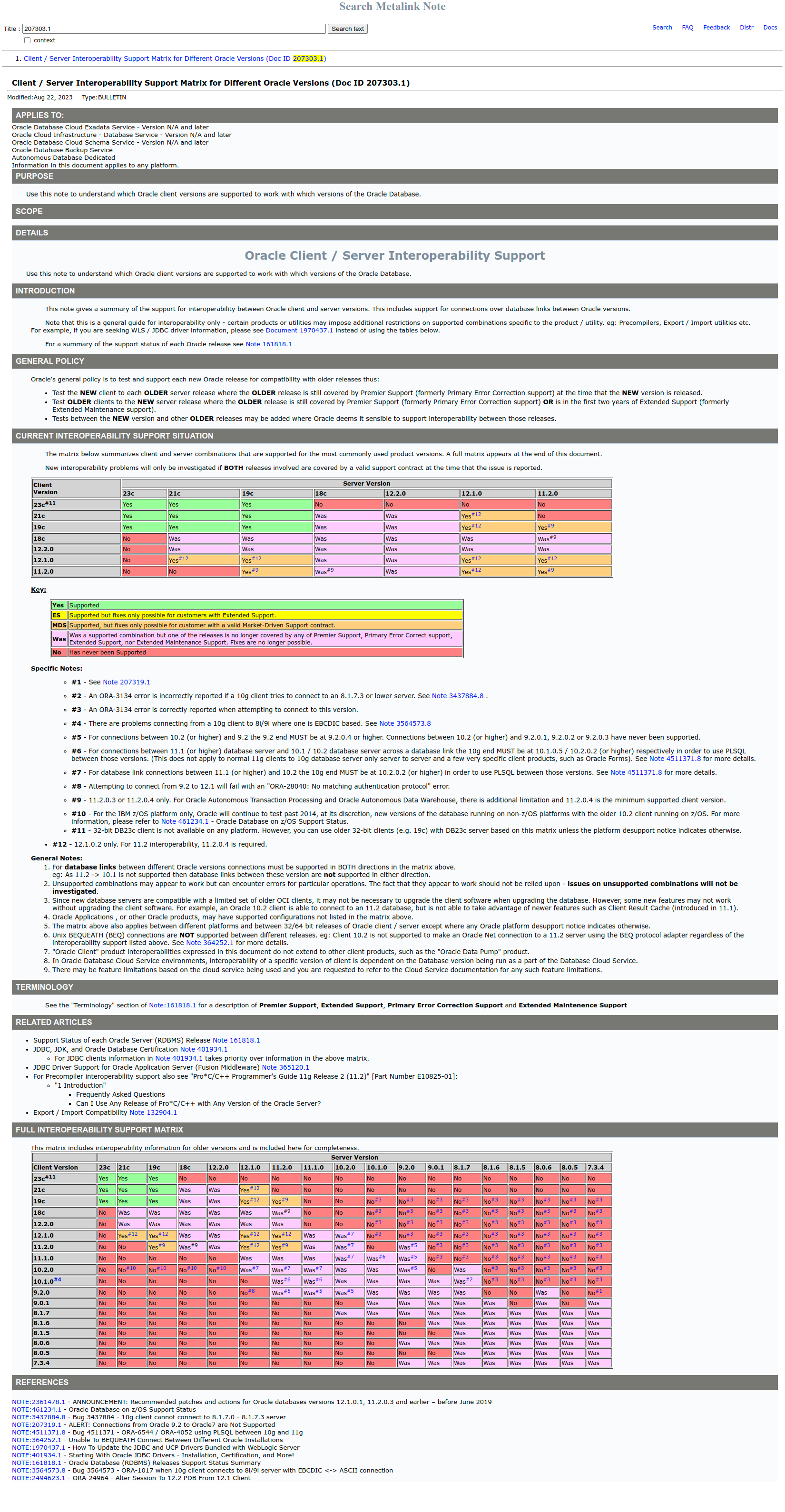
Oracle instant client compatibility table with oracle databases as of 2024.04.18